
Why New YouTubers Struggle in the Beginning
YouTube’s recommendation system has become extremely advanced.
It can analyze videos, understand viewer behavior, and recommend content to the people who are most likely to enjoy it.
But here is the problem:
This system does not fully understand a brand-new channel right away.
When a channel has been publishing consistently for a while, YouTube has more data to work with.
It can start to understand:
- what the channel is about
- who watches the videos
- which viewers respond well
- what kind of content performs best
- how people behave after watching
Over time, this helps YouTube recommend the channel to a more accurate audience.
But a brand-new channel is different.
At the beginning, YouTube has very little data. It does not clearly know the channel’s identity, target audience, or content quality yet.
That is why many new creators feel like their videos are not reaching the right people.
This does not mean the algorithm is ignoring them.
It simply means the channel has not provided enough consistent signals yet.
That is why early channel setup matters.
A good setup will not magically make a channel go viral. But it can help YouTube understand your channel faster and reduce confusion in the early stage.
Think of it this way:
Your channel settings do not control the algorithm. They help YouTube understand your channel with less confusion.
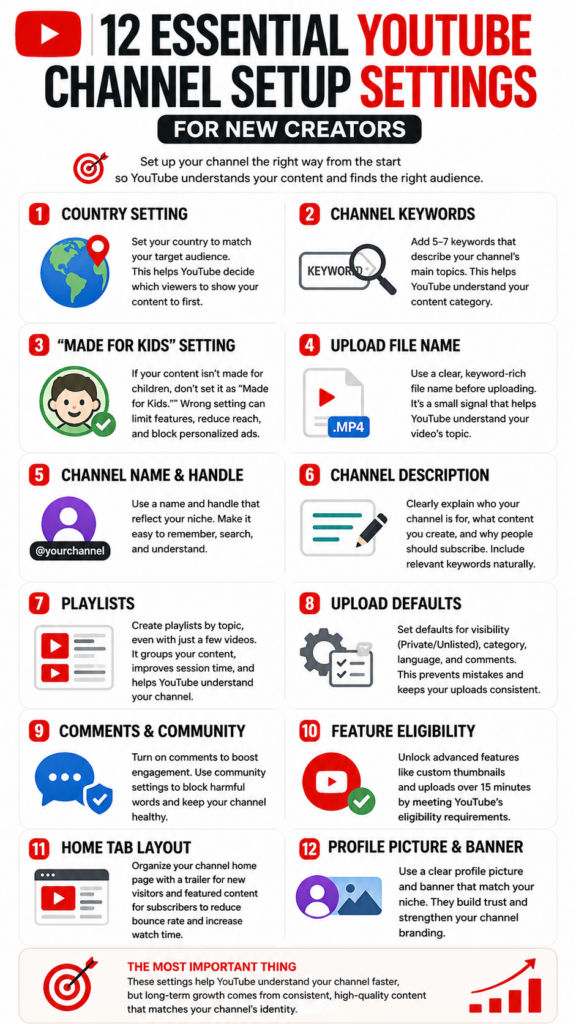
12 Important YouTube Settings for New Channels
1. Country Setting
The first setting to check is your channel’s country.
Go to YouTube Studio and make sure your channel country matches your target audience.
For example:
If your content is mainly for Korean viewers, set the country to South Korea.
If your content is mainly for American viewers, set it to the United States.
This does not mean YouTube will only show your videos in that country.
But it creates a clearer regional signal for your channel.
For new channels, clarity is important.
You do not want your content, language, and target market to send mixed signals.
2. Channel Keywords
Channel keywords help describe the overall topic of your channel.
They are not as powerful as they used to be, but they can still help YouTube understand the broad category of your content.
The key is not to stuff random keywords.
Use 5 to 7 clear keywords that represent your channel.
For example, if your channel is about YouTube marketing, you could use:
YouTube growth, YouTube strategy, content marketing, creator economy, video marketing, audience growth, social media strategy
The goal is simple.
Make it easy for YouTube to understand what kind of channel you are building.
3. “Made for Kids” Setting
This is one of the most important settings for new creators.
YouTube requires creators to tell whether their content is made for kids or not.
You can set this at the channel level or video level in YouTube Studio.
If your content is not specifically made for children, you should not mark it as “Made for Kids.”
Why?
Because videos marked as made for kids have important limitations.
For example, personalized ads and some interactive features can be limited. Comments, notifications, and other audience engagement features may also be affected depending on the content and setting.
This can seriously affect how a new channel builds early audience data.
However, if your content is truly made for children, you must mark it correctly.
Do not use this setting as a growth trick.
Use it accurately.
4. Upload File Name
Before uploading a video, name your video file clearly.
For example, instead of uploading a file called:
final_edit_03.mp4
Use something like:
youtube-channel-setup-for-beginners.mp4
The file name is not a major ranking factor.
However, using a clear topic-based file name is still a good habit.
It keeps your workflow organized and may provide another small consistency signal.
For a new channel, every clear signal helps.
Your file name should match the topic of the video.
It is a small habit, but a useful one.
5. Channel Name and Handle
Your channel name and handle are part of your brand identity.
A good channel name should be:
- easy to remember
- easy to search
- connected to your topic
- clear enough for a new viewer to understand
If your channel is about YouTube strategy, your name should make that obvious.
For example:
Channel Strategy Lab
YouTube Growth School
Creator Strategy Studio
A clever name can be good.
But a clear name is usually better for a beginner.
In the early stage, do not make people guess what your channel is about.
6. Channel Description
Your channel description should explain three things:
- who your channel is for
- what kind of content you make
- why people should subscribe
Do not just list keywords.
Write a clear description that includes the words your target audience naturally searches for.
Example:
This channel helps new creators grow on YouTube with practical strategies for video ideas, titles, thumbnails, audience psychology, and channel positioning. If you want to build a YouTube channel with a clear content strategy instead of guessing, this channel is for you.
This kind of description helps both viewers and YouTube understand your channel.
7. Upload Defaults
YouTube Studio allows creators to set upload defaults.
This is useful because it keeps your uploads consistent.
Important upload default settings include:
- visibility
- category
- language
- comments
- license
- audience setting
For new creators, I recommend setting the default visibility to Private or Unlisted.
Why?
Because it prevents accidental publishing.
You can upload the video, check the title, thumbnail, description, subtitles, end screens, and settings, then publish when everything is ready.
This simple habit can prevent many beginner mistakes.
8. Category and Language
Your video category should match your content.
If your channel is about education, choose Education.
If your channel is about entertainment, choose Entertainment.
If your channel is about gaming, choose Gaming.
Do not overthink this.
But do not ignore it either.
Also, set your video language correctly.
If your video is in English, set it to English.
If your video is in Korean, set it to Korean.
This helps YouTube process the content more accurately, especially for captions, search, and viewer matching.
9. Comments and Community Settings
For most channels, comments should be turned on.
Comments are useful because they create audience signals.
They show how people react, what they are confused about, what they agree with, and what they want next.
But you also need moderation.
Early comments can shape the emotional atmosphere of a video.
If the first few visible comments are negative, spammy, or toxic, new viewers may be influenced by that tone.
That is why you should use YouTube’s community settings to block harmful words, spam phrases, and repeated abusive language.
This protects both the channel and the creator’s mental energy.
A healthy comment section helps a channel feel more trustworthy.
10. Feature Eligibility
New creators should check their feature eligibility in YouTube Studio.
This matters because some important creator tools require verification or advanced access.
For example, longer videos and custom thumbnails may require certain eligibility levels.
This is important because thumbnails are one of the biggest click drivers on YouTube.
If you cannot use custom thumbnails, you lose control over one of the most important parts of your video packaging.
So before uploading seriously, unlock the necessary features.
11. Home Tab Layout
Your channel homepage matters.
When someone watches one of your videos and clicks your channel, they should immediately understand what your channel is about.
A good homepage should include:
- a channel trailer for new viewers
- a featured video for returning subscribers
- playlists organized by topic
- your best-performing or most representative videos
- a clear visual structure
Do not treat the homepage like a random video list.
Treat it like a store entrance.
If the entrance is confusing, people leave.
If the entrance is clear, people explore.
12. Profile Picture and Banner
Your profile picture and banner are not just decoration.
They are part of your trust signal.
When a viewer lands on your channel, they should quickly understand:
- who you are
- what your channel is about
- what kind of value they can expect
Your profile picture should be clean and recognizable, even at a small size.
Your banner should communicate your channel promise.
For example:
Helping Creators Build Smarter YouTube Channels
or
YouTube Strategy, Audience Psychology, and Content Growth
A good banner does not need to be complicated.
It needs to be clear.
Bonus: Shorts Remix Permission
Shorts remix permission can also help your channel grow.
YouTube allows creators to remix eligible videos in different ways.
For example, other creators may use a short clip from your video, use your audio, or react to your content.
This can help your content spread through other creators.
It can create more exposure, more references, and more chances for viewers to discover the original video.
This is not always the right choice for every channel.
If your content is highly sensitive, premium, or brand-controlled, you may want to be careful.
But for many creators, especially in entertainment, commentary, education, memes, reactions, and Shorts-based content, remix permission can be a useful growth opportunity.
The Most Important Point
These settings help YouTube understand your channel faster.
But they do not replace good content.
If your channel name, keywords, description, and banner say your channel is about YouTube strategy, but your videos are mostly about Instagram, YouTube will eventually understand your real content behavior.
The algorithm learns from what you actually upload.
So your setup matters.
But your consistency matters more.
Your channel settings are the introduction.
Your videos are the proof.
Final Summary
A new YouTube channel starts with very little data.
That is why early setup matters.
The most important settings are:
- country setting
- channel keywords
- “Made for Kids” setting
- upload file name
- channel name and handle
- channel description
- upload defaults
- category and language
- comments and community moderation
- feature eligibility
- home tab layout
- profile picture and banner
These settings do not guarantee growth.
But they reduce confusion.
And in the early stage of a channel, reducing confusion is already a big advantage.
The best strategy is simple:
Set up your channel clearly, then upload consistently in the same direction.
That is how you help YouTube understand who your channel is for.
For more YouTube algorithm insights, click here.